01 / ARTICLE DRAFTSGenerate an article
Generate an article
from your brief.
Enter your keyword, audience and key points. Choose a language and tone to guide an outline and article draft.

BriefOutlineArticle
 novexwrite.
Write blog posts, how-to guides and website content from a clear brief. Generate a structured draft, edit the details and export your article from one workspace.
Set the topic, audience and tone.
Review the draft before publishing.
Keywordwriting product descriptions
VoiceClear and informative
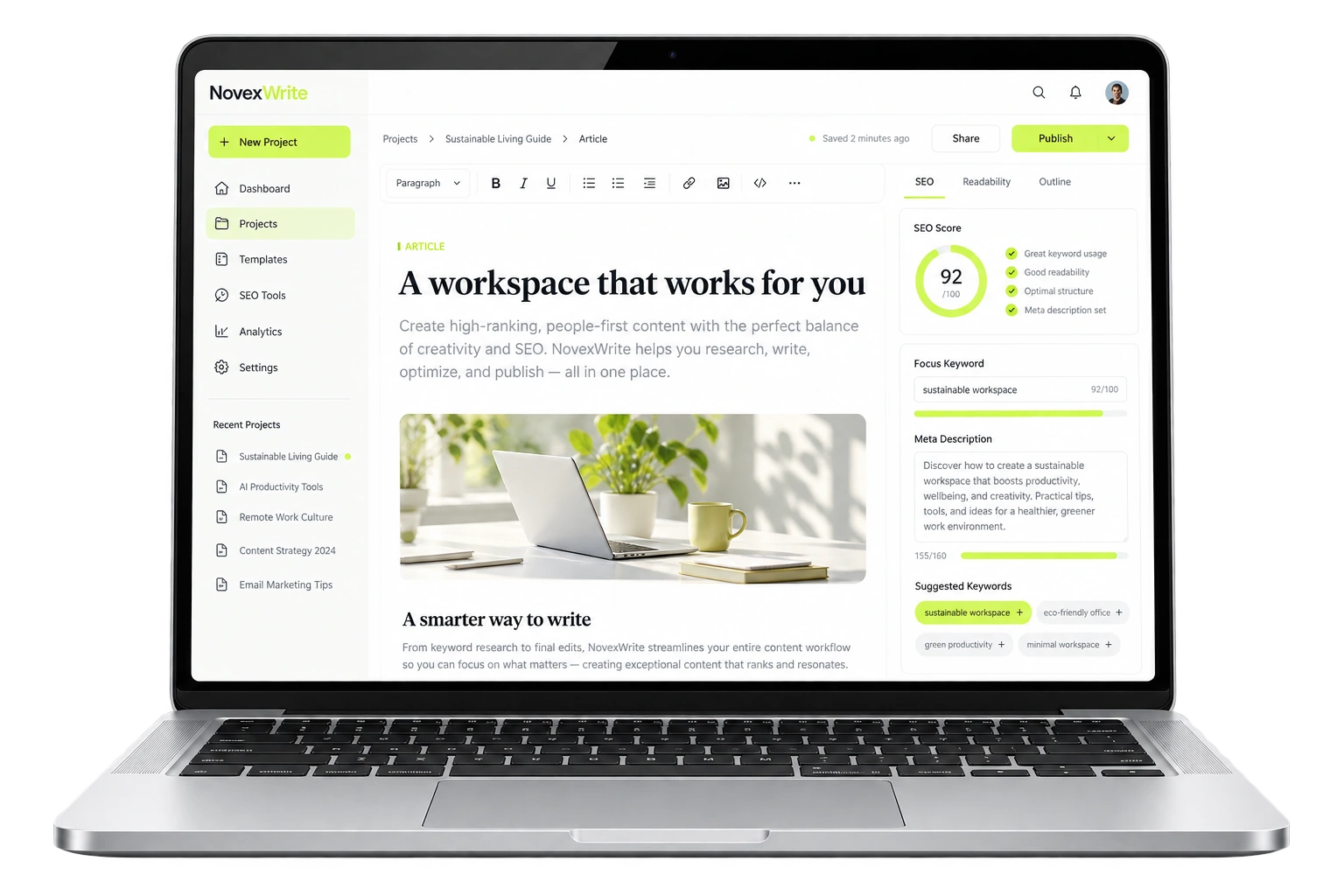
Create article drafts with a defined topic and structure, then review the content and search details in the same editor.
Enter your keyword, audience and key points. Choose a language and tone to guide an outline and article draft.
Draft a focused title, descriptive headings and a meta description. Review and edit each one alongside your article.

Use your OpenAI, Anthropic or Google API key with NovexWrite’s article prompts, brief fields and editing tools.
See supported providers
Edit the draft, verify claims and add your own knowledge. Save your changes and export the content when it is ready.

 Novex Assistant
 brings article generation into your subscription. Choose a topic, add your brief and use your saved business details to give each draft the right context.
Start with a ready-made writing prompt, select your tone and review the result in your editor. Built-in generation uses your monthly allowance, with no separate AI account to set up. Free-tier capacity and regional availability apply.

Use the product details and audience from my business profile.

Save your products, services, audience, tone and approved facts in a business profile. Select it when you start an article, so you can focus on the topic instead of rewriting the same background information.
Keep a separate profile for each brand or client. Update the details when your business changes, then use the latest information in your next draft.
An article-level checklist brings your SEO checks into one review: title, headings, keyword use, meta description and paragraph structure.
Each check explains what it measures and suggests a next step. See which parts of the draft need work as you edit.
An illustrative interface. The score reflects stated content checks and does not predict search rankings.
Start with a prompt for the job: explain a topic, write a how-to guide, describe a product or answer customer questions. Then choose a tone that suits your audience.
The presets guide the draft toward clear language, useful detail and natural phrasing. Adjust the instructions and edit the result to match your own voice.
Start with the reader’s goal. Break the task into clear steps. Include a practical example where it helps. Use the approved facts from the business profile.
Choose a content type and describe what you need. Use the same brief, tone and editing controls across your drafts.
Draft how-to guides, explainers and blog posts around a topic, audience and main keyword.
Draft an articleDescribe your business or product, then draft copy that explains its features and benefits.
Write website copyGenerate a title and meta description with your draft, then edit them to reflect the page.
Write search detailsRequest an outline to organize your topics, or open a saved article and edit the draft.
Plan your articleYou can already connect an OpenAI, Anthropic or Google API account. Choose your supported model and use it with NovexWrite’s article briefs and editor. Your provider bills API usage separately.
Your API account connects to your NovexWrite workspace.Connect your OpenAI API account to generate article drafts with a supported GPT model.
Guide the draft with your keyword, useful headings and a meta description.
Apply writing instructions for clear structure, relevant detail and natural keyword use.
Specify who the article is for, how it should sound and which points it must cover.
Bring your own API key. Provider usage is billed separately. Available models and data handling depend on your provider’s terms and policies.
Connect your provider in AI settings first.
Then enter a brief, generate and edit.
Add a keyword, audience and key points. Choose the content type, language and tone for your draft.
Your connected AI model generates an outline, article title, meta description and draft from your brief.
Check the facts, revise the text and save your changes. Download HTML or plain text to use in your website or CMS.
Each paid plan includes 50 article drafts per user per month, saved articles, editing and exports. AI provider usage is billed separately.
Showing prices for 1 user · 50 article drafts per month
Billed monthly.
$19.00 per month
Get 1 monthRenews monthly.
Pay for 3 months. Save 5%.
$18.05 per month · Save 5%
Get 3 monthsRenews every 3 months.
Pay for 6 months. Save 12%.
$16.72 per month · Save 12%
Get 6 monthsRenews every 6 months.
Pay for 12 months. Save 20%.
$15.20 per month · Save 20%
Get 12 monthsRenews every 12 months.
Contact us to discuss availability, pricing and usage limits for your team.
Prices in USD. Draft allowances reset each calendar month without rollover. Provider API usage is billed separately. An active subscription is required to use the workspace. Subscriptions renew automatically until canceled in Plans & billing. Paid checkout opens after payment setup. When enabled, Polar acts as the authorized reseller and merchant of record for purchases made through Polar Checkout.
How the writer works, what you need and what your plan includes.
The paid workspace includes saved business profiles, live SEO checks, writing presets, saved drafts, editing and exports. Generation is available through your connected API account. Novex Assistant provides built-in generation where available, subject to daily capacity.
Your plan covers the NovexWrite writing workspace: article prompts, brief and tone controls, draft allowances, saved articles, editing and exports. AI model usage is separate and billed by your connected provider.
Not for Novex Assistant where built-in generation is available. You can also connect an OpenAI, Anthropic or Google API key in AI settings and enter a supported model ID. A ChatGPT, Claude or Gemini chat subscription does not replace an API account.
NovexWrite is an AI-powered writing tool focused on SEO articles and blog content. The workspace also helps create website copy, product descriptions, outlines, titles and meta descriptions.
No. NovexWrite helps structure your article and write search details. Rankings depend on content quality, competition, your website and many other factors. There are no guaranteed rankings or traffic results.
Yes, the writing workflow keeps you in control of the draft. Edit the text, verify facts and sources, and add your own expertise before publishing. AI-generated content can contain errors.
Yes. Download your article as HTML or plain text and transfer it into WordPress or another CMS. NovexWrite does not publish directly to your website.
Yes. Create your account with your email, connect your own OpenAI, Anthropic or Google API key, and activate a subscription. Edit, save and export your articles from your dashboard. Your provider charges separately for API usage.
Original, lawful content using material you own or have permission to use. Infringement, fake reviews, deceptive claims, adult content, spam and unlawful use are prohibited. See the acceptable-use terms below.
Choose a plan, connect your AI provider and turn your brief into an editable article.
Create your account